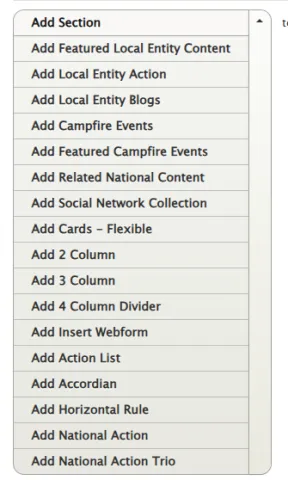

Basic Page - Featured Content
There are a couple ways to feature content on your site via sections: Related National Content and Featured Local Entity Content.
Basic Page -- Two Column
A section for having two columns of differing widths. The content is just a flexible text block.
Basic Page - 3 Columns
This section is for adding three columns to a page. It becomes one column on mobile and tablet.
Basic Page -- Cards
This is a way of creating a series of items that are displayed in a similar fashion, which could lead to another page on your site, or an external page. There are a couple of different ways the image can be formatted. More than three can be added....
Basic Page -- Featured Campfire Events
This section allows you to a add a text list of Campfire events pulled directly from the API. Marketing tags can be used to filter this content.
Basic Page -- National Action & Trio
These are two different ways to insert KnowWho actions on a page.
Basic Page -- Section
The most basic of the Sections is the "section" a Title and Text block. It would also provide an image that will be displayed in a separate column
Basic Page -- KnowWho Action List
There are few different ways to get Salesforce KnowWho Actions on your page.
Basic Page -- Accordion / Collapsible Sections
Accordions or collapsible sections are very useful for things like FAQs.