Your Chapter, Your Vote
The Sierra Club is member-led from the ground up. Our policies and priorities come from members like you, and voting in Club elections is one of the most important ways to shape our work.
It’s time to vote for the next at-large members of the Kentucky Chapter Executive Committee, who will begin their two-year terms in January 2027. If you live in one of our local Group areas, you’ll also vote in your Group’s executive committee election.
Start by reading the candidate bios, then vote online or by mail.
- Online: open until 11:59 p.m. ET on Friday, December 4
- By mail: the printed ballot in the Cumberland lists a postmark deadline of November 30, but please mail your ballot as early as you can, since the Thanksgiving holiday can slow delivery.
To vote online:
- Online voting will take place via members MyAccount portal.
- Sign into your MyAccount and access your ballot.
- If you are new to MyAccount scroll down to learn how to sign in for the first time.
- Online voting closes December 4th.
To vote by mail:
- A paper ballot is in the November edition of The Cumberland with instructions on mailing it in. Make sure to include your membership number that can be found on the front of any edition of The Cumberland.
- You can print a copy of the paper ballot here and mail it to: Sierra Club Kentucky Chapter, P.O. Box 1368, Lexington, KY 40588-1368.
- Please mail your ballot as soon as you can. The Thanksgiving holiday can slow the mail, and we want every ballot to reach the Election Committee in time to be counted. Ballots must be postmarked by November 30th.
Where to find voting on your MyAccount homepage
To cast your ballot online you will sign in to the MyAccount portal, and simply click on the button that says, "Vote in your local Chapter/ Group Elections." See below for a sample view. If you have never signed in to your account before you can scroll down for more information on how to sign in for the first time. |
|

First time users of MyAccount
MyAccount is a website for Sierra Club members and supporters. You can adjust your contact information and communication preferences, and view your membership, donation and store purchase history. You can also access other portals of information. Below are the steps to create your account.
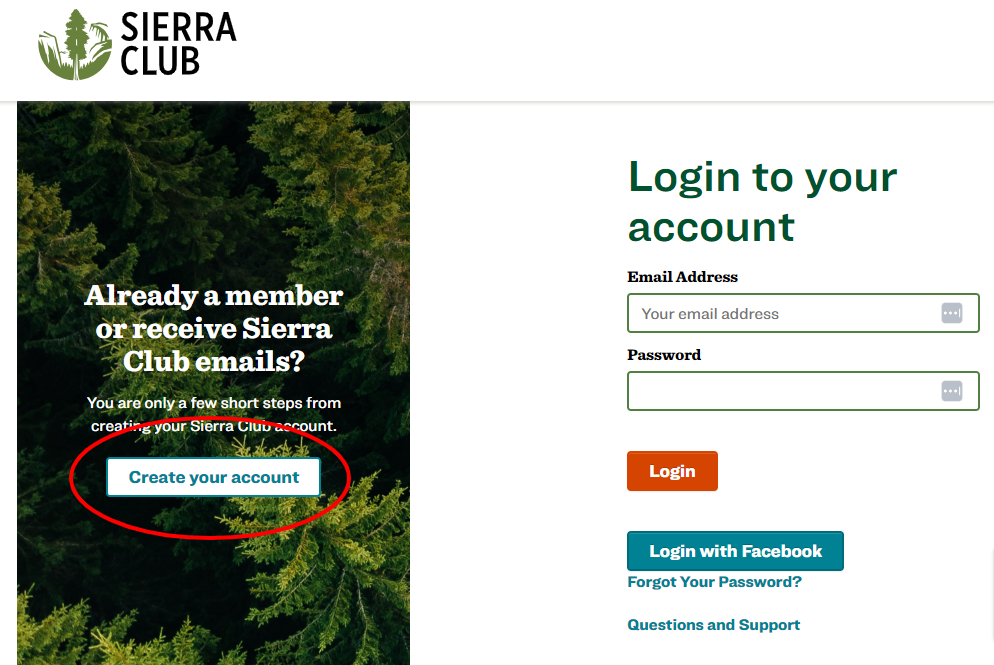
| Step 1: Click on the Create your account button on the left. | |
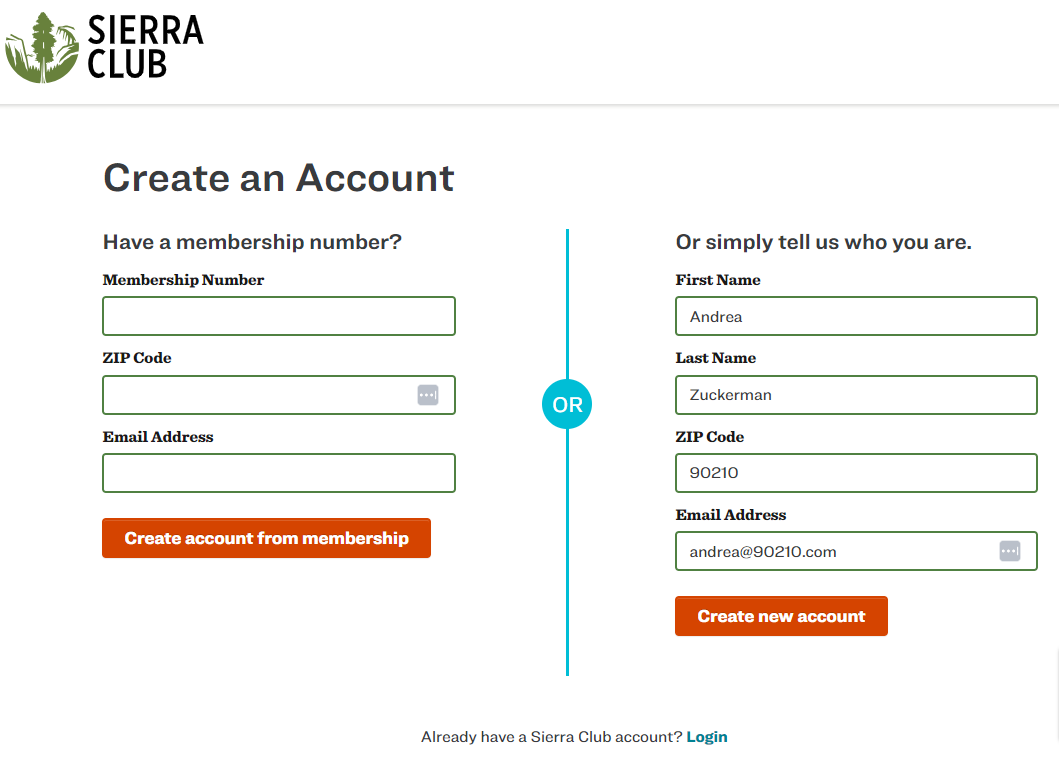
| Step 2: If you know your membership number, which you can find on the mailing label of The Cumberland or Sierra Magazine, you can enter it on the left, along with your zip code and email address, then click on the Create account from membership button | |
If you don’t know or don’t have a Membership Number, enter your first name, last name, zip code and email address on the right, then click the Create new account button. |
|

Where to go for help
If you have any questions or run into any trouble, please email member.care@sierraclub.org.